
OnDemand
The evolution of a booking page

MY ROLE
Senior Product Designer
TEAM
Product Manager, Tech Lead, QA
TOOLS
Figma, User-Interviews, Questionnaires, Hotjar
CONTEXT
The OnDemand booking page is the first step a manager takes to create a job and invite workers — the flow that connects hospitality venues and events with vetted workers in real time. It needed to work equally well on desktop and mobile, for managers booking a single shift and managers juggling a multi-day event with dozens of positions.
My Role: I worked closely with the Head of Design, Product Manager, and key stakeholders to understand and evolve this experience through end-to-end design, evolution, and upkeep.
PROBLEM
How to simplify complex customisations
The original booking experience was functional, but it was built on assumptions about what managers needed — assumptions that didn't hold up once real users started interacting with the page.
Managers ran into:
A job creation flow that felt fragmented and unclear, especially on mobile
Location details that weren't flexible enough for complex venues, like stadiums or multi-entrance sites
No efficient way to handle multi-day or recurring bookings without repeating the entire process each time
The problem was how to evolve a simple booking form into something that could handle real complexity, without making the basic case any harder for the manager booking a single, straightforward shift.
RESEARCH & INSIGHTS
Rather than relying on speculative design, the approach leaned into user feedback and pattern observation.
Key inputs included:
Competitive pattern review, looking at booking flows in comparable commercial spaces like Uber and Airbnb to see what worked well elsewhere
Prior project experience, drawing on lessons from Gumtree around data entry and mobile limitations
Direct client feedback, collected informally and through tools like Intercom, to surface pain points that only show up in real usage

Example of Gumtree’s add item page
"The address isn't showing the exact location."
— Booking Manager feedback
"How can I book more than one day?"
— Booking Manager feedback
These weren't abstract pain points — they were the exact questions managers were raising in real usage, and they became the throughline for everything that followed in the redesign.
PROCESS
Lean, iterative approach
The process started small and grew only where real usage demanded it.

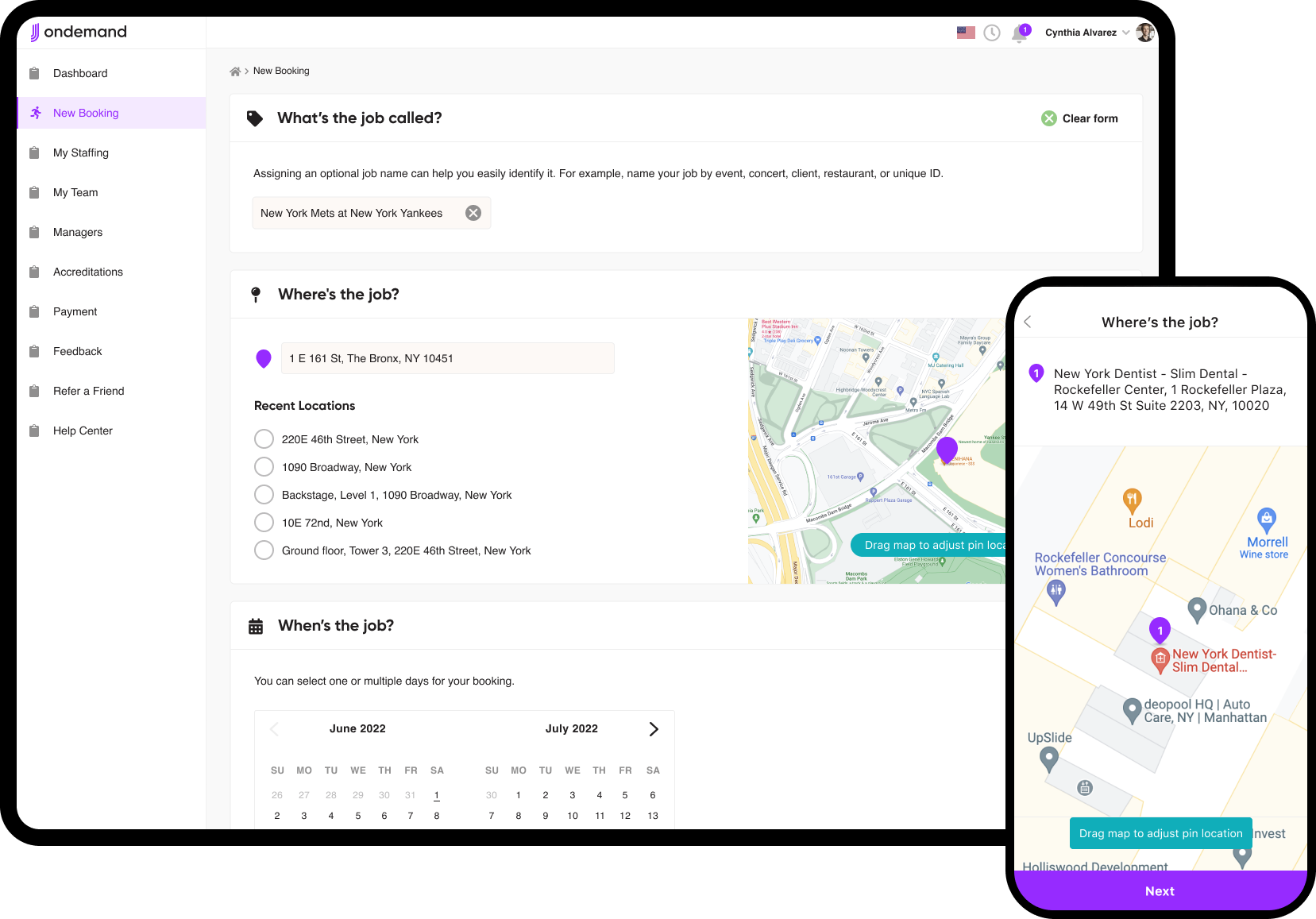
What started as three simple fields — location, job date & time, and position details — grew into a considerably richer set: job naming, manager assignment, document uploads, refined map-based location, travel stipends, multi-job and recurring date handling, and pre-job training flags.
Every addition traced back to a real manager need surfaced through research, not a feature added for its own sake.
Started with the essentials.
A basic booking form captured just location, date & time, and position details — nothing more than what was needed to get a job live.
Refined through feedback loops.
The form was progressively built out based on early user interaction, feedback, and stakeholder prioritisation, rather than trying to anticipate every need upfront.
Layered in edge cases as they emerged. Quality-of-life enhancements and edge-case handling — like staggered dates or saved positions — were added as real booking use surfaced the need for them, not designed in advance on a hunch.

Designed desktop and mobile independently.
Rather than force one layout onto both, each platform respected its own strengths — a robust one-page form on desktop, a progressive step-by-step form on mobile to reduce clutter and keep focus.
SOLUTION
The final design delivered a comprehensive, flexible booking experience that scaled with the complexity of the job, without punishing managers booking something simple.
-
![]()
Select Job Location
-
![]()
Provide Job Date
-
![]()
Select Attire
-
![]()
Review Position Responsibilities
-
![]()
Booking Checkout


SOLUTION Cont.
The following demonstrates how we refined OnDemand to cater towards the clients needs. Whether quality of life updates or completely new features, it had to work across both desktop web and mobile app.
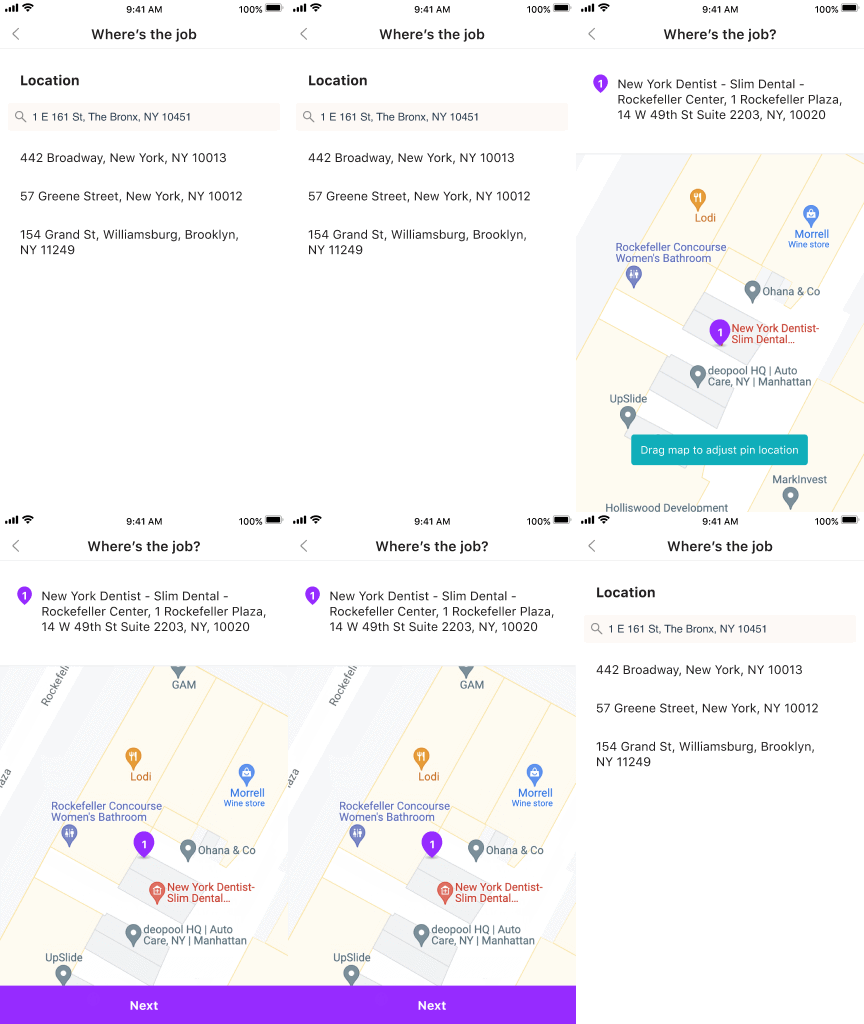
“The address isn't showing the exact location”
For managers hiring at stadiums or large venues, a single street address wasn't enough. Workers often needed a specific staff entrance or entry point that no generic address could capture. The fix let managers fine-tune the exact location directly on the map, moving the pin to the precise spot workers needed to see on their invite.

Adding the ability to move the pin-drop to an exact location.
“How can I book more than one day?”
Managers didn't want to repeat the entire booking process just to add a second day with the same or slightly varied details. The redesign added support for staggered days, multi-day bookings, and recurring bookings, including a press-and-hold gesture on mobile to set up recurring shifts quickly.
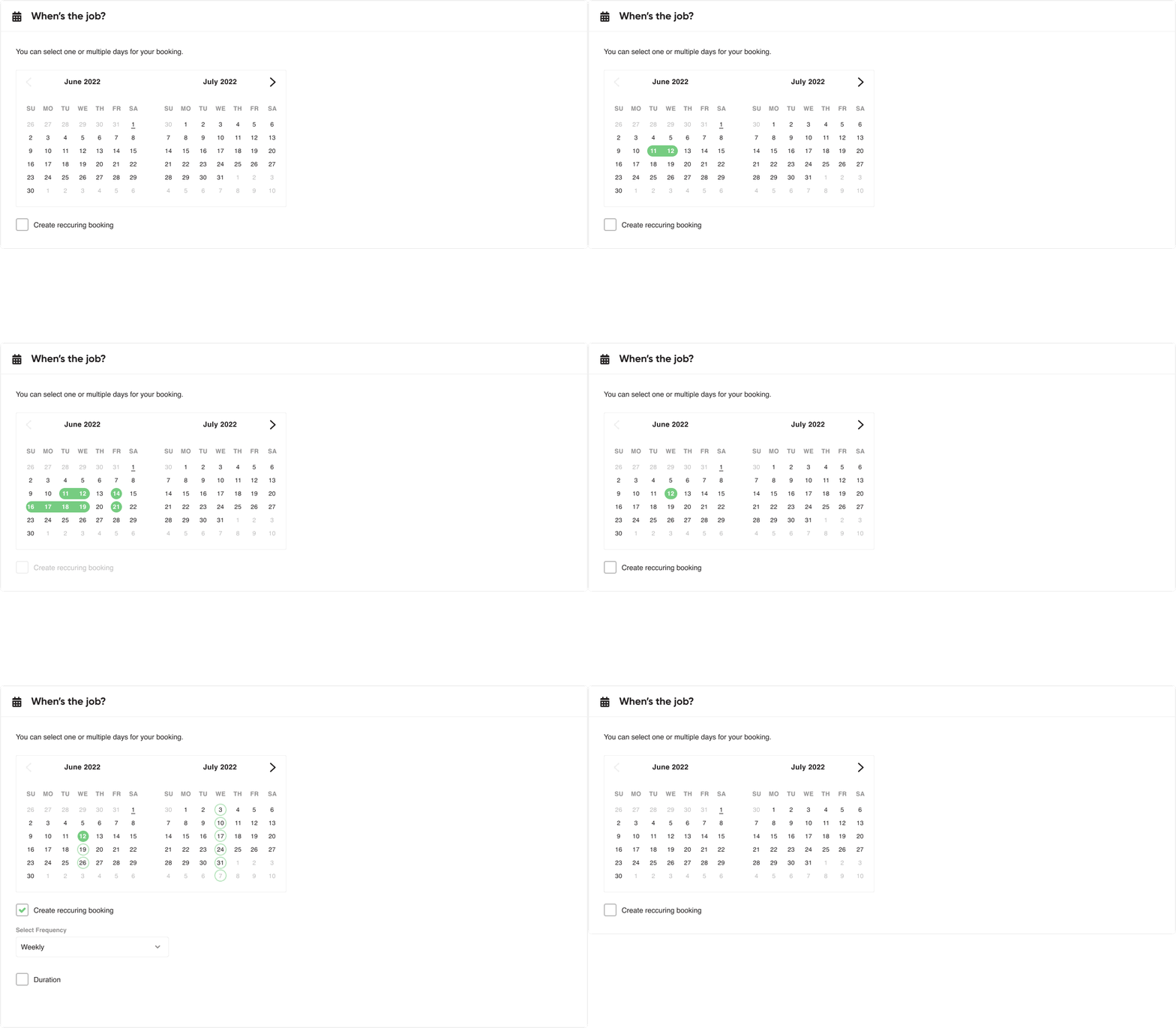
The ability to choose one date, multiple dates, staggered date, re-occurring dates.

Mobile App: The ability to press-and-hold in order to create re-occurring bookings
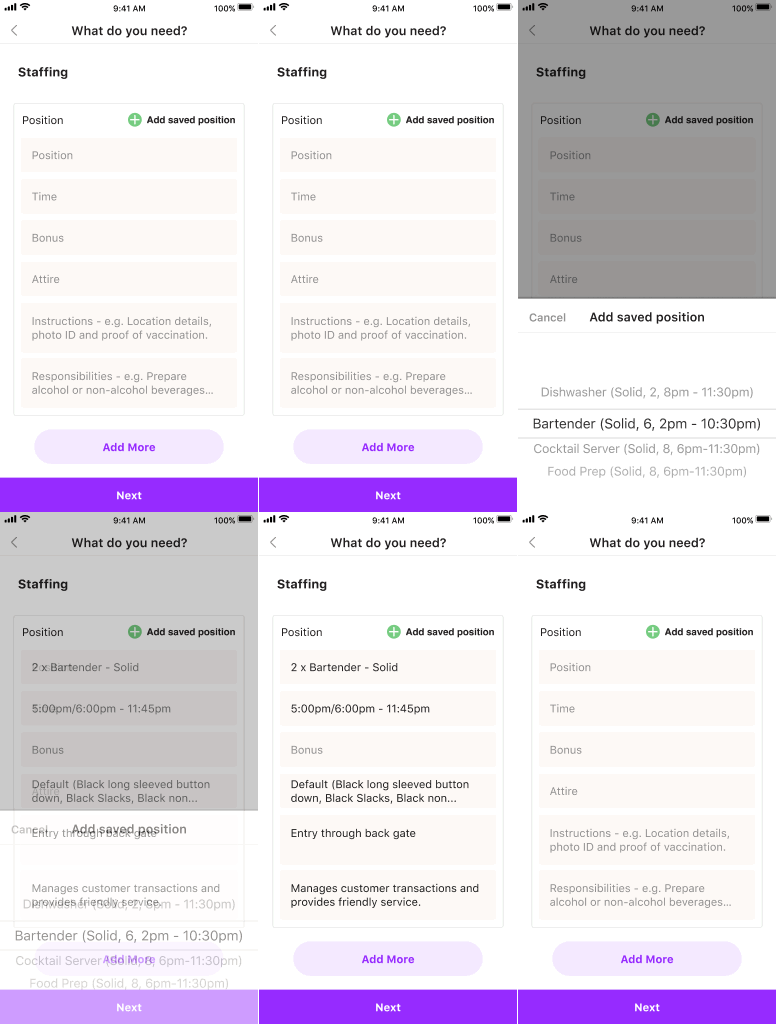
“If booking multiple days, how can I easily add the same position across those days, or change the positions depending on which day is selected?”
Once multi-day bookings existed, position details needed to flex too. Worker counts, experience tiers, and start times could all vary from one day to the next. The solution let managers pull in previously saved positions from historical bookings, cutting out a significant amount of repeat data entry.

Adding positions from previously saved positions reducing significant amount of time
“I want to be able to change the positions attire”
A need that surfaced specifically from catering clients: attire needed to be adjustable per booking, not fixed to a role or position. That flexibility was added directly into the booking flow — via a selection modal on desktop, and a native picker pattern on mobile.

Desktop: Assigning attire opens up a modal to select individual clothing items

Mobile: Assigning attire opens using native app pattern to select individual clothing items
IMPACT
The iterative bookings redesign transformed the experience from a rigid, basic form into a dynamic, flexible tool that better matched managers’ actual workflows.
Post-iteration results included:
Greater booking accuracy through better location precision and expanded position detail fields.
Reduced friction for complex jobs, especially multi-day or recurring bookings.
Improved mobile usability so managers could create jobs on the go without confusion.
Enhanced confidence that invites and shifts were being created correctly the first time.
REFLECTION
This project reinforced the value of evolving a design based on real behaviour rather than assumptions. Even a straightforward booking form got complicated fast once it met the reality of diverse venues and business needs.
Designing mobile and desktop independently, rather than compromising toward a single layout, let each platform do what it does best.
Responding to edge cases as they emerged, rather than trying to solve for every scenario upfront, kept the core experience simple while still growing to handle real complexity.
Ultimately, the evolution of the job booking page drove more managers to successfully create bookings, which translated directly into more worker invites and fulfilled gigs.